

Why did my post fail?
A failed post is not a dead end: it carries the network’s own answer, the history of what Dropslate tried, and a Retry button. The post drawer - the same panel in Queue, Calendar and the Dashboard - shows all of it. This page reads it section by section and says which failures fix themselves, which need one click, and which need a change to the post.
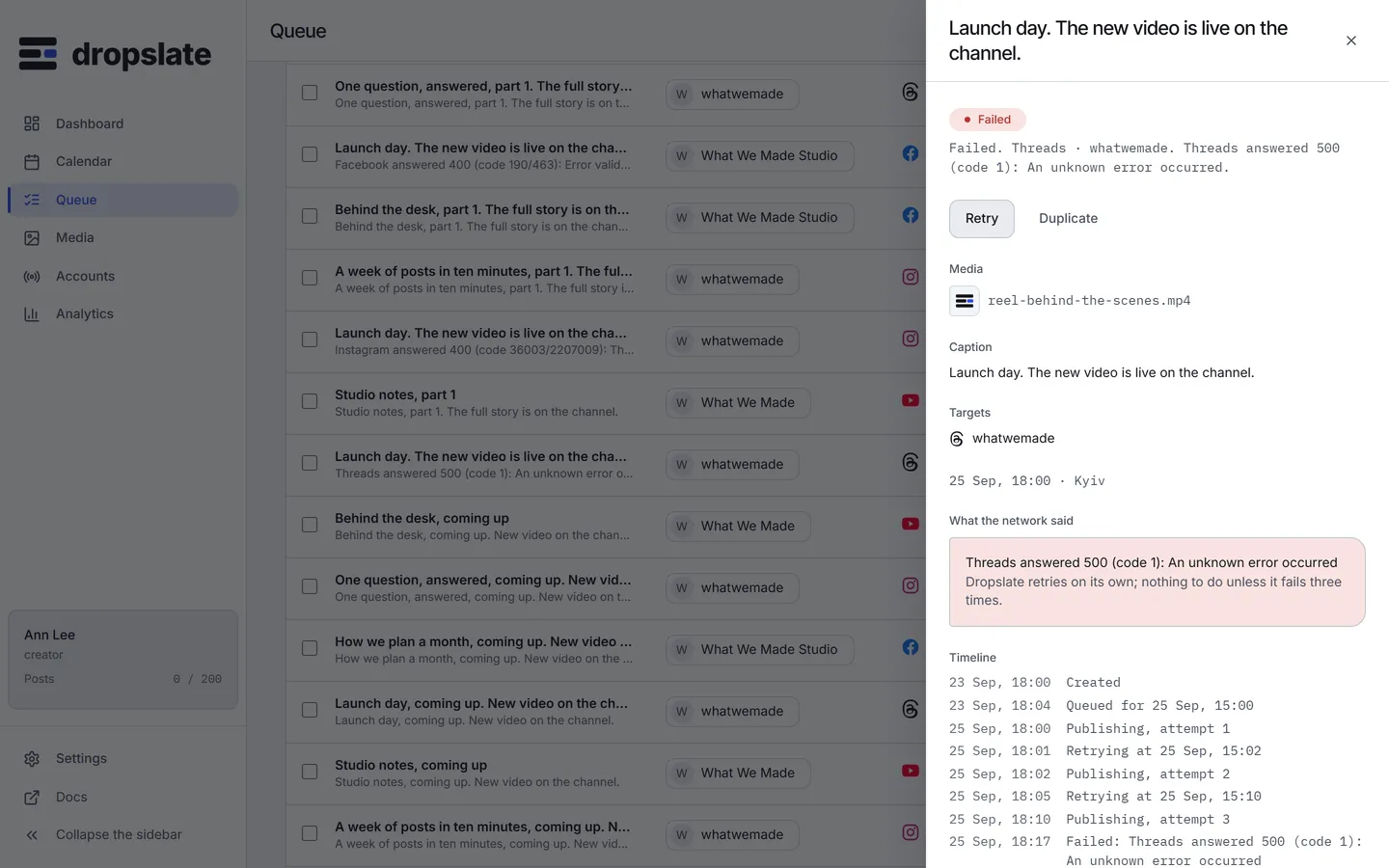
The drawer, section by section
Section titled “The drawer, section by section”- Status line (top) - one sentence:
Failed. Threads · @whatwemade · 18 Sep, 18:00 (Kyiv).The same line the API returns asstatusLineand an agent reports. - Timeline - every event with its time: Created, Queued for a time, Publishing (attempt 1, 2, 3), Retrying at a time with why, Failed with the message, Went live. The attempts tell you whether Dropslate already retried on its own.
- What the network said - the network’s response verbatim (
message), the stablecode, and thehint. This text is not paraphrased. - Actions - Retry for a failed post; Duplicate to start a corrected copy as a draft.
Three classes of cause
Section titled “Three classes of cause”The file. The network refused the media: a format it does not take, a Reel that is not 9:16, a video over its duration. Codes such as aspect_unsupported, video_too_long, image_format, or a *_rejected whose message names the file. These are normally caught in the plan before the post exists; at send time they mean the network’s rules changed or the file changed. Retry does not help. Fix the file, Duplicate the post with the new file, schedule the copy.
A field. Text over a limit, a refused character, a missing required setting. Codes caption_too_long, forbidden_chars, youtube_title_required, facebook_link_text_only, threads_link_with_media. Retry does not help either; edit the post (a failed post can be duplicated and corrected) and schedule it again.
The network or the token. The account’s token expired or was revoked (*_token_rejected, *_permission_missing), the network’s own rate limit or quota (*_rate_limited, youtube_quota_exceeded), or a network outage (*_unavailable). Retry helps - after the cause is gone: Reconnect the account first for a token problem; wait for the window for a limit. Transient causes are retried by the worker on its own, 1, 5 and 15 minutes later; the timeline shows each attempt.
When Dropslate retries by itself
Section titled “When Dropslate retries by itself”A failure marked transient in the connector - network errors, the network’s rate limits, YouTube’s daily quota - schedules an automatic retry; up to three, at 1, 5 and 15 minutes. After the third the post stays failed for you. A validation failure never retries on its own: sending the same refused request again would fail the same way.
Checklist
Section titled “Checklist”- Read What the network said. If it names a file property or a field, change the post; Retry is pointless.
- If it names the token or a permission, open Accounts: an Expired or Disconnected card means Reconnect, then Retry.
- If it names a limit or a quota, look at the timeline for “Retrying at”: the worker already scheduled it. Otherwise Retry after the window.
- Still failing? The message and the code are what support needs: hello@dropslate.top.
Common errors
Section titled “Common errors”| Error | Cause | Fix |
|---|---|---|
| Retry is missing | The post is not failed. |
Only a failed post can be retried; a queued one can be cancelled or rescheduled. |
| Retried, failed again with the same message | The cause did not change. | Read the message; it is a file or field problem. |
| Failed right after Publish now with a token message | The token stopped working since the account was connected. | Reconnect, then Retry. |
Related
Section titled “Related”- Common errors - the codes.
- Retry & cancel, Post statuses
- Connection problems