

How connecting works
Connecting an account means authorizing Dropslate on the network’s own site, once. You are sent to the network’s sign-in and consent screen, approve a short list of permissions, and come back; the network hands Dropslate an access token for that one channel. Dropslate never sees or stores your password, and the token is encrypted at rest, decrypted only inside the worker that publishes and the one route that disconnects, and never returned by the API, written to a log or shown to an MCP agent.
Before you start
Section titled “Before you start”- A workspace, and the role of owner or admin in it - members can publish to connected accounts but not connect or disconnect them.
- Room under the plan’s account limit: Free 2, Creator 6 Creator+, Studio 20 Studio+, Agency 50 Agency+, counted across all networks together.
- Accounts → Networks, click Connect on a network.
- Sign in on the network’s site and approve the consent screen. Meta asks you to pick a Page and the Instagram account linked to it; Google shows the channel of the account you signed in with.
- Back in Dropslate, the channel appears under Your channels with Connected and the date.
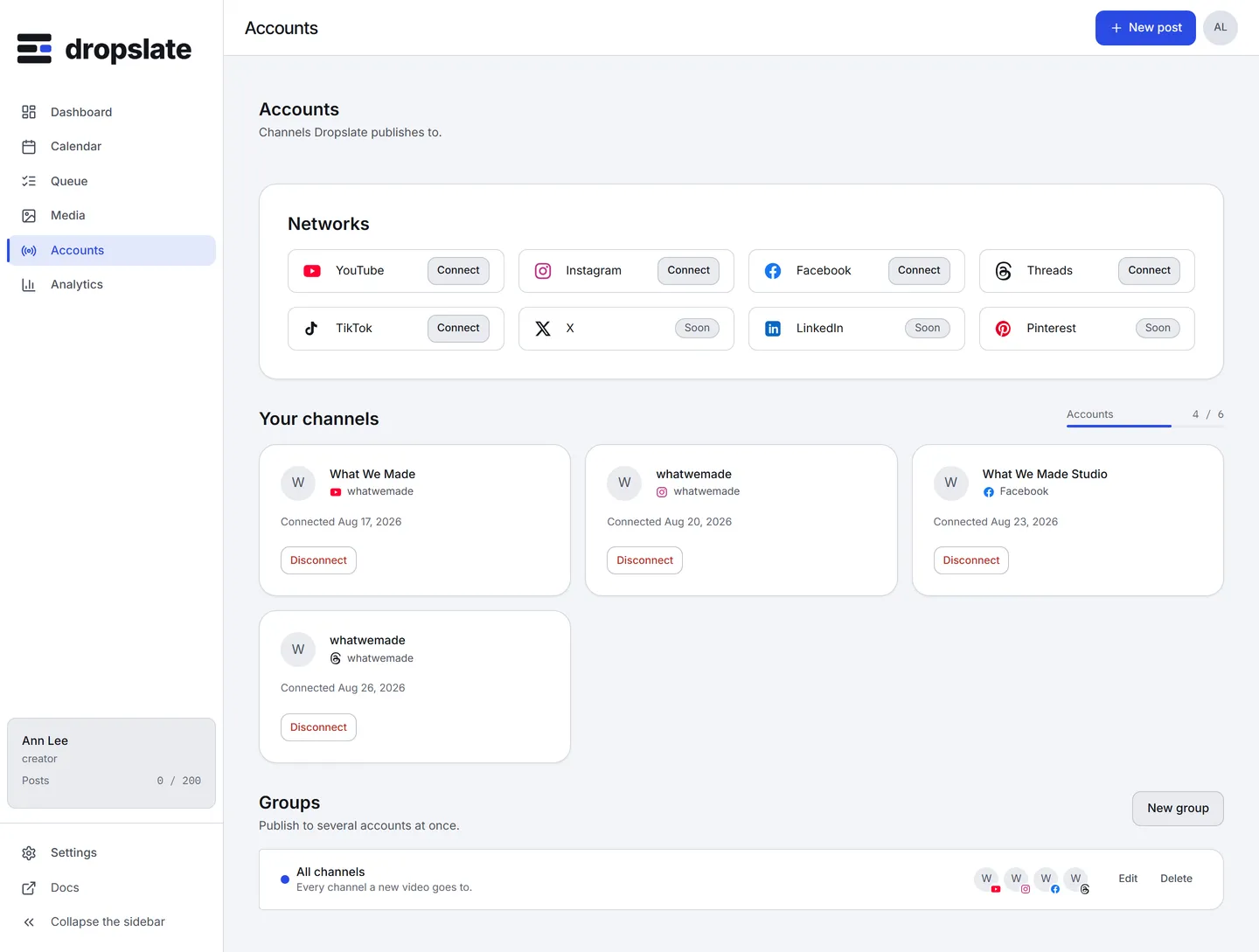
Token states
Section titled “Token states”Every connected account is in one of three states, shown on its card and returned by the API as status:
| State | Meaning | What to do |
|---|---|---|
ok (Connected) |
The token works; posts to this account are sent. | Nothing. |
expired (Expired) |
The network no longer accepts the token - it aged out, or you changed the password or enabled two-factor sign-in on the network. | Reconnect. Queued posts wait and are sent once the token works again. |
revoked (Disconnected) |
Access was withdrawn on the network’s side (you removed Dropslate in the network’s settings, or Meta’s deauthorize callback fired), or you clicked Disconnect. | Reconnect to publish to it again; nothing that already went out is touched. |
Reconnect does not create a duplicate. It repeats the sign-in for the same channel, replaces the token and keeps the account id, its groups and its post history. Disconnect deletes the stored token immediately and asks the network to forget the connection; queued posts to that account go back to draft.
What Dropslate asks for, and why
Section titled “What Dropslate asks for, and why”| Network | Permissions, in the network’s words | Used for |
|---|---|---|
| YouTube | Upload videos; view the channel; manage the channel (youtube.force-ssl) |
Uploading and scheduling videos, setting a thumbnail and playlist, reading the channel’s statistics |
| Manage and publish content; read insights (Facebook Login for Business) | Creating and publishing media containers, reading post and account statistics | |
| Manage Page posts; read Page engagement; show the list of Pages | Publishing to the Page, reading its statistics, listing the Pages you can choose from | |
| Threads | Basic profile; publish content; read insights | Publishing threads, reading their statistics |
| TikTok (when the connector ships) | Post content; basic user info (Login Kit) | Direct Post publishing, showing the account name and avatar |
No permission to read messages, comments or followers lists is requested. The full data statement is in Security & privacy.
Common errors
Section titled “Common errors”| Error | Cause | Fix |
|---|---|---|
?connect=refused&reason=... |
Declined on the consent screen, or refused by the network; reason is the network’s own word. |
Approve; check the network’s page for what the account must be. |
quota_exceeded |
The plan’s account limit is reached. | Disconnect an account you no longer use, or upgrade. |
| Expired shortly after connecting | The network issued a short-lived token and Dropslate could not exchange it, or a password change on the network followed. | Reconnect; if it repeats, see Connection problems. |
| The same channel appears twice | Connected twice from two different Dropslate workspaces - each workspace has its own connection. | Expected; disconnect it from the workspace that should not publish to it. |
Related
Section titled “Related”- One page per network: YouTube, Instagram, Facebook, Threads, TikTok; X, LinkedIn, Pinterest.
- Accounts & groups - the screen itself.
- Data deletion - what happens to the network’s data when you disconnect or delete the account.